Bridge analysis
Funds that leave one blockchain and arrive on another break a trace: the transaction ends, and the money reappears somewhere the graph is not looking. Bridge analysis is what carries the trace across that gap.
Tracer has two mechanisms. The automatic one is the one to use.
Automatic detection
Every transaction list you open is checked for bridge activity in the background; you do not ask for it.
A transaction identified as a bridge transfer carries a blue link badge; hover it and it says It’s bridge.
Adding that transaction to the canvas adds the bridge with it. There is no second step: the bridge appears as its own node, wired to the transaction that entered it and to the one that came out on the destination chain. A cross-chain movement then reads as one continuous path instead of stopping dead at the chain boundary.
Bridge nodes behave like the rest of the graph, including in Merged Txs Mode, where several crossings through the same bridge collapse into a single line.
The bridge view
Click a bridge node, or the connection running through it, to open it. The header names the service and the protocol behind it: Bridged via Bridgers (Protocol SwftSwap).
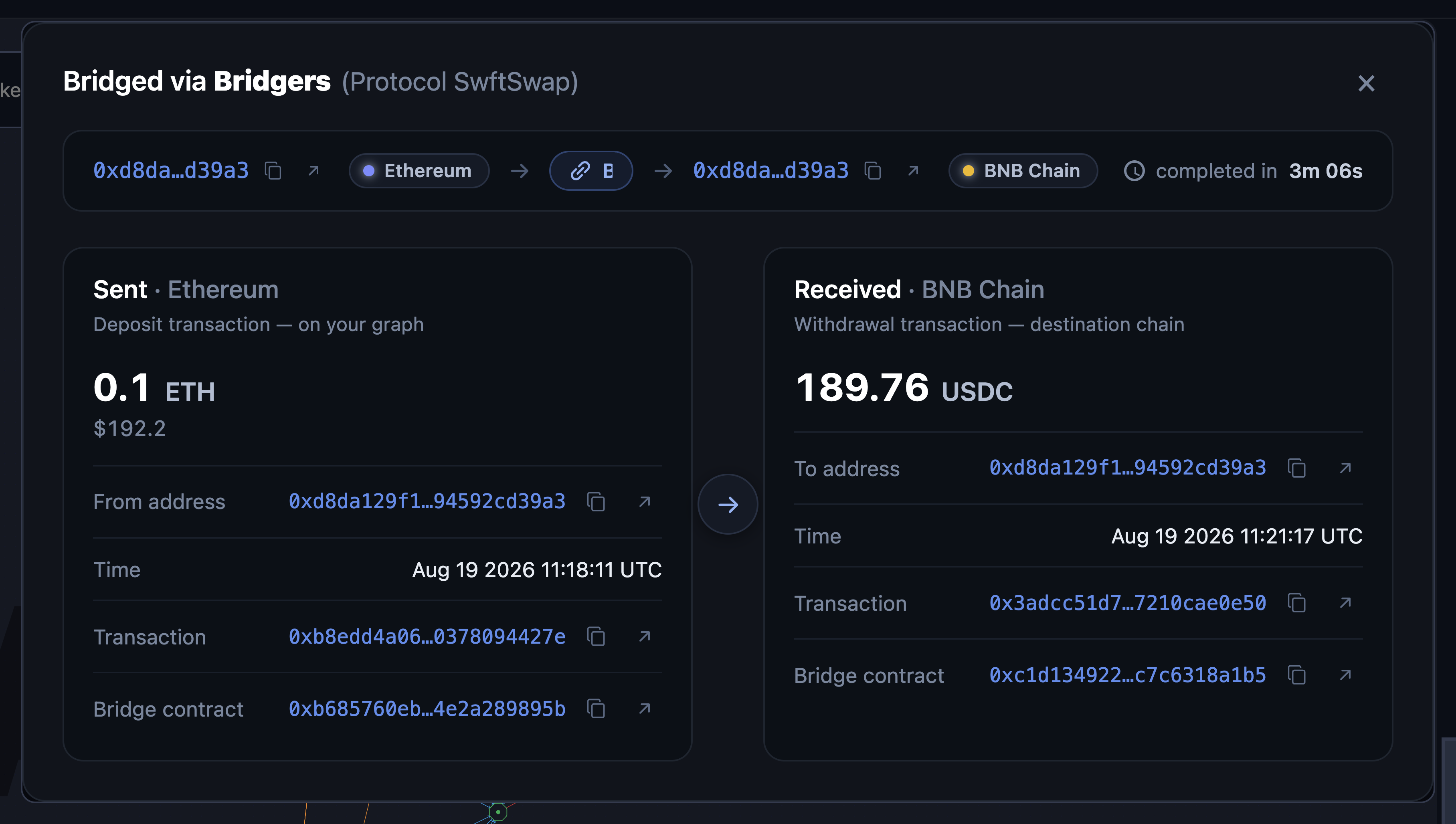
Each crossing is shown as a flow: source address and chain → the bridge → destination address and chain, with how long it took (completed in 4m 12s), or in progress if the funds have not landed yet.
Below that, the two legs side by side:
| Sent | Received | |
|---|---|---|
| Deposit transaction (on your graph) | Withdrawal transaction (destination chain) | |
| Amount | what left, with its fiat value | what arrived, with its fiat value |
| Address | where it came from | where it landed |
| Time | deposit timestamp | withdrawal timestamp |
| Transaction | the source hash | the destination hash |
| Bridge contract | the contract on the source chain | the contract on the destination chain |
Addresses, hashes and contracts can all be copied or opened in the relevant block explorer.
Where the contract you interacted with is not the bridge’s own contract, both are listed: Interacted with alongside Bridge contract. A router or aggregator sitting in front of the bridge shows up here.
The two sides are often different assets. Many bridges swap as they cross (0.1 ETH in, 189.76 USDC out), so the amounts are not meant to match, and comparing them directly says nothing. Read each leg with its own symbol, and use the fiat values underneath if you need to judge whether value was lost in the crossing.
One transfer can involve several hops. Those are numbered Crossing 1, Crossing 2 and so on, each with its own pair of legs.
Manual check
The older mechanism, still available for a single transaction you want to test directly.
Open the transaction view and click Check Bridge. The button reports its own progress: Analyzing…, then View Bridge Results, or Retry Bridge Check if it failed.
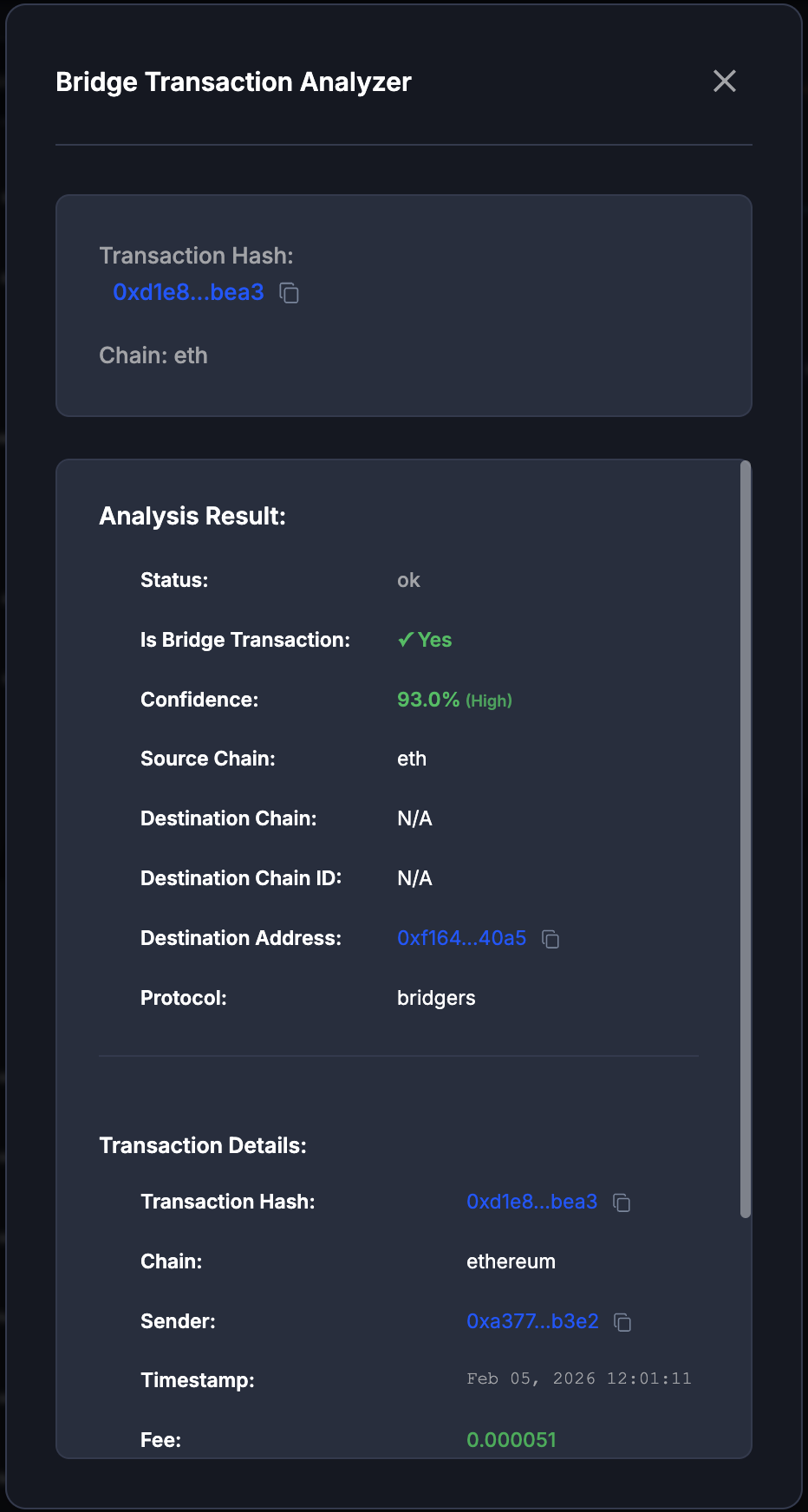
The result is a verdict rather than a graph object:
| Field | Meaning |
|---|---|
| Is Bridge Transaction | Yes or No. |
| Confidence | How sure the detection is, as a percentage. |
| Protocol | The bridge service, when it can be identified. |
| Source / Destination Chain | Where the funds left from and arrived. |
| Destination Address | The receiving address. |
| Status | Completed, failed, or still pending. |
| Reason | Why the verdict came out as it did. |
Transaction Details below it carries the underlying facts: hash, chain, sender, timestamp, fee, amount, token, and (once the funds arrive) the destination hash and its timestamp.
Every check you run is kept in the Bridge analysis bookmark on the edge of the screen, filtered by All, Pending or Bridges, so you can return to an earlier verdict without re-running it.
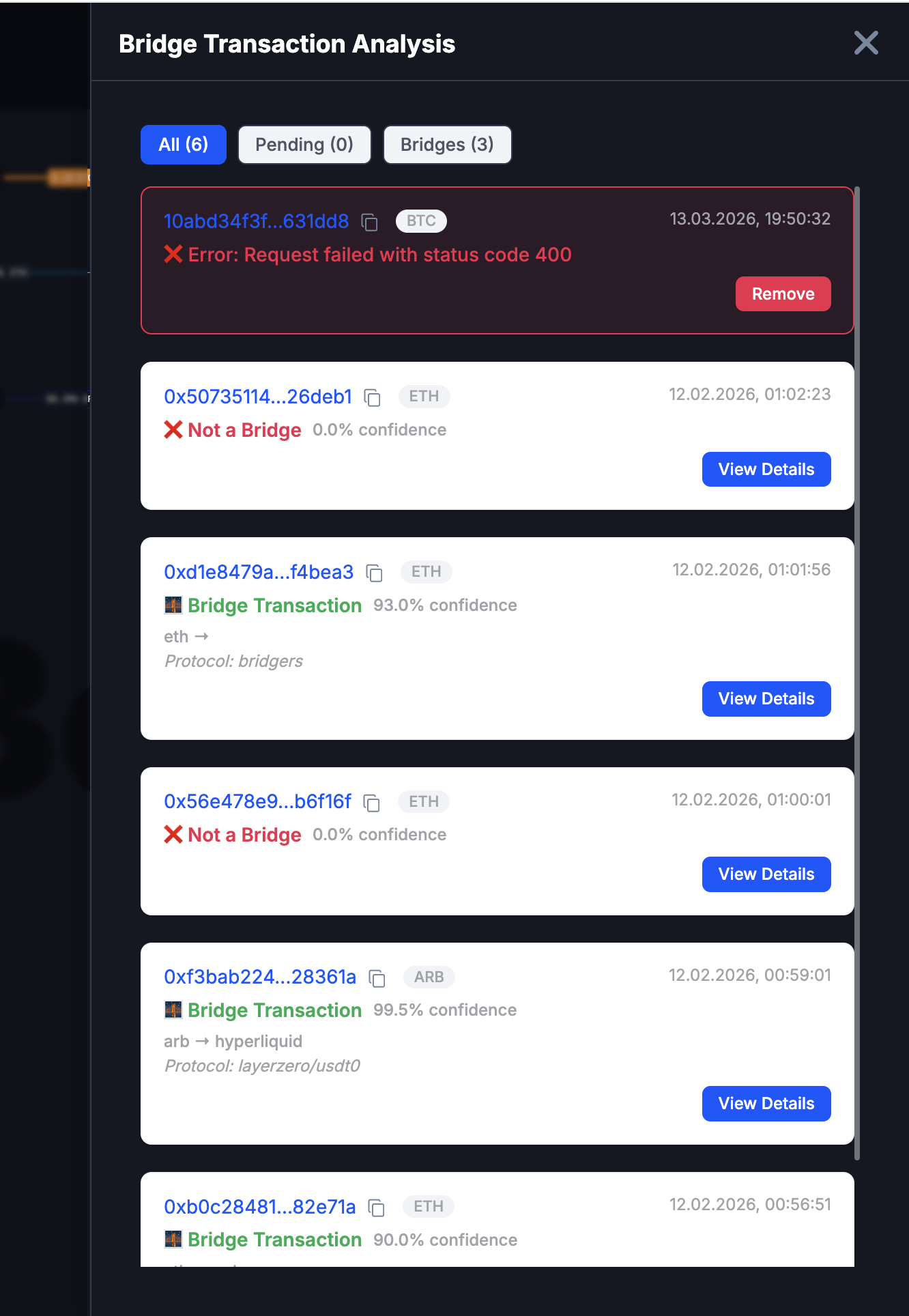
A manual check produces a verdict, not a bridge on the canvas. To continue the trace across the chain, add the transaction from the address view and let automatic detection place the bridge for you.
Confidence is a judgement, not a fact on the chain. A high percentage with a named protocol is strong; a middling one with no protocol is a lead to verify, not a conclusion to report.
When nothing is found
- Not a bridge: the transaction was checked and is an ordinary transfer. That is a result, not an error: it rules something out.
- Blockchain not supported: bridge detection does not cover every chain Tracer can trace.
- No badge in the list: no crossing was detected for that transaction.
Where it fits
Bridge analysis sits alongside the other two per-transaction checks: the Connections view for what two objects exchanged directly, and the Interactions page for the same data with room to work in.